How to Loop Engineering
The human is the loop: what loop engineering is, why everyone is talking about it, how to run one with four commands in Claude Code or OpenCode, and why you should stay in charge of it.

I first saw loop engineering appear in June 2026. Instead of feeding the agent a prompt, you build the framework that feeds it. In my case, four commands together with one prompt close a full loop. I act as the scheduler, on purpose.
Doing this requires an agentic coding skill, and this article introduces it.
The skill here is getting the model to write its own prompts. The model drafts the plans and the work orders that later sessions execute, and your prompting shrinks to approving what it wrote.
What Loop Engineering Is
In one week in June 2026 I heard the same refrain from three different voices. Peter Steinberger argued that loops should be built to prompt coding agents rather than prompting the agents directly; the post amassed eight million views. Boris Cherny, head of Claude Code at Anthropic, now says he stops prompting Claude and instead runs loops that prompt Claude and decide the next step [13]. Addy Osmani echoed the idea on his blog, dubbing it “Loop Engineering” [1].
I’ll set aside the theory and define loop engineering in plain terms: you replace yourself as the one who prompts the agent and construct a system that takes over that role instead [1].
I earlier explained the layer beneath this in the loop is the easy part, detailing fifty lines that remain constant and the harness built around them. Loop engineering sits one level higher. A recent IEEE conference working note positions it as the fourth layer above the harness [6].
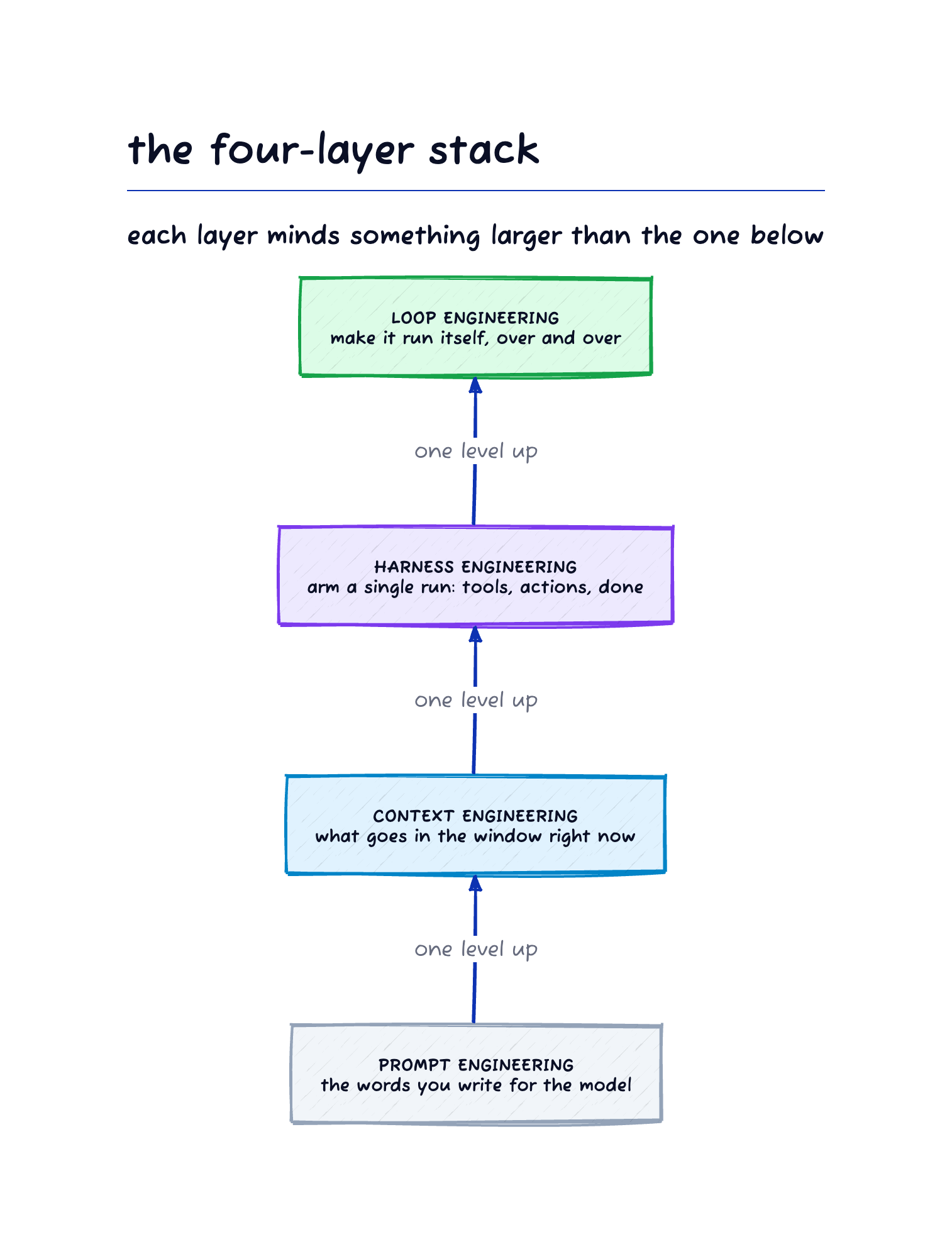
Figure 1. The four-layer stack. Each layer minds something larger than the one below. Loop engineering automates the “waiting for you” that the harness leaves behind.
The loop comprises five moves. First, discovery determines what this turn should do. Next, handoff moves the task into an isolated worktree so parallel agents don’t interfere. Then verification swaps in a second agent to refuse work, because the one that wrote the code cannot grade its own homework. Persistence writes results to a durable location, such as a pull request, a state file, or a board. Finally, scheduling closes the cycle and turns one iteration into a loop [6].
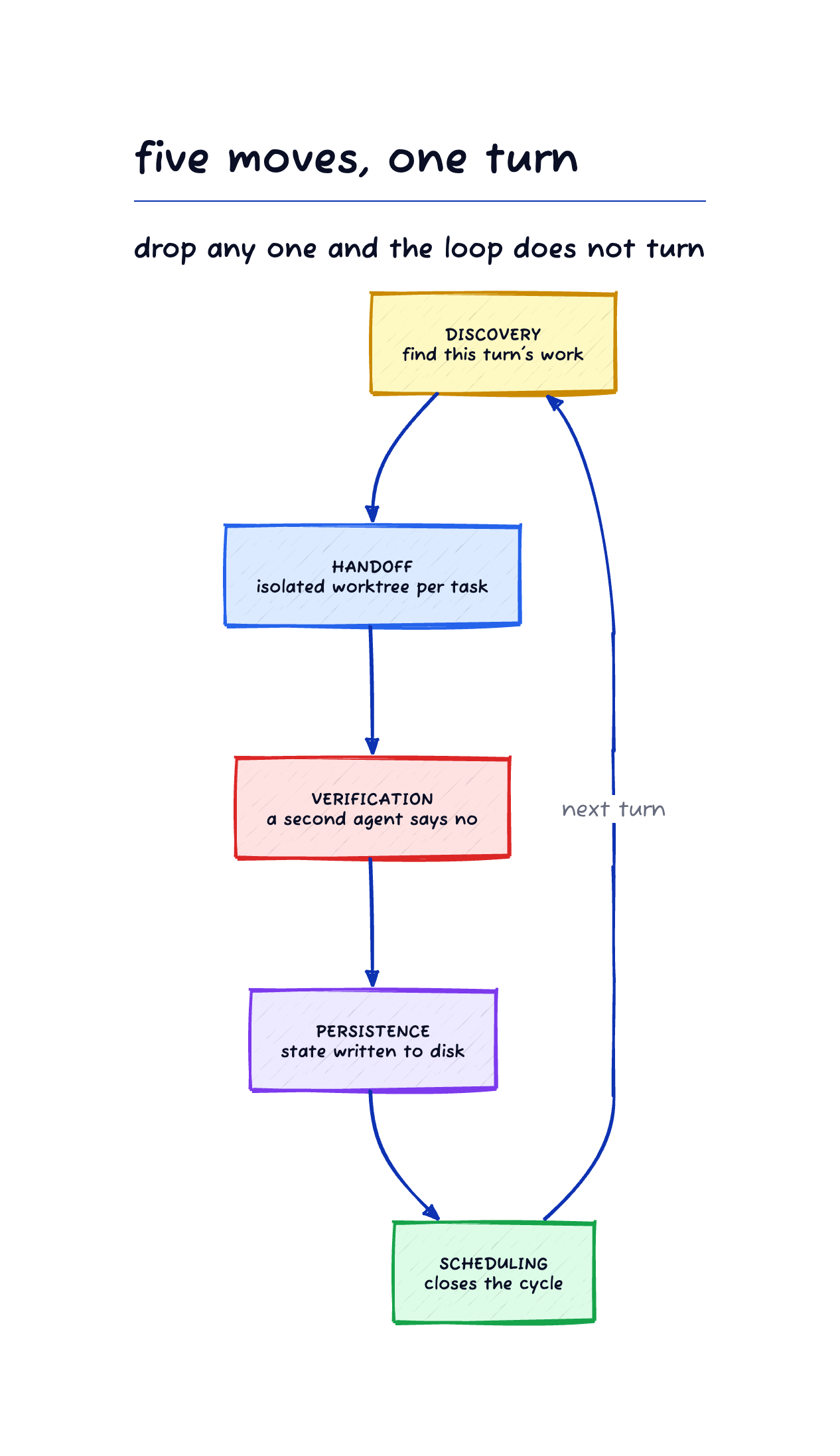
Figure 2. The five moves of one loop turn. Drop any one of the five moves and the loop does not turn. The most skipped is verification. Without an independent check, the loop nods at its own output indefinitely.
Youssef Hosni maps it onto six stages: trigger, context, action, verification, state update, and decision [2]. The human assembles the loop, then steps back.
Why You Should Care
I’ve heard the buzz that prompt engineering is dead now that the new AI loops have taken over. Take Cherny, who runs five Claude Code instances in parallel and keeps another five to ten web sessions open [4]. Automated loops tend pull requests every five minutes, turn Slack feedback into code changes every thirty minutes, and prune stale PRs each hour. Stripe merges over 1,300 machine‑written pull requests a week [6]. The tooling works and the output ships. Even at the AI Engineer World’s Fair, where the loops debate headlined, skeptics summed it up: “the hype is outrunning the discipline” [8].
Yet the discipline holds up without the hype. Externalizing state to GitHub lets each new turn start from a fresh context window rather than relying on the model’s memory. I also stop the code-writing agent from grading its own output, catching errors a self-review would miss. To keep parallel agents from interfering, I give each task its own directory under the worktree pattern.
These ideas hold up with or without automated scheduling.
The Commands
Four coding‑skills commands power the loop [7]. Each lives in a markdown file that spells out the goal, lists the files to read, lays out the phases to run, and defines completion. The harness reads the file and the agent proceeds until it finishes. I keep them in Claude Code (.claude/commands/) and in OpenCode (.opencode/commands/). I install them once and they are then available to every project. The OpenCode path, using GLM 5.2 on a fixed‑price plan, is written up separately.
The planning command /make-work scans the project specs and open issue list, verifies consistency, and suggests the next batch of work. Each issue lists required reading, files to touch, requirements, and acceptance criteria. It proposes, and then I decide.
/gh-issue-push creates GitHub issues. Before it writes, it scans the codebase for ripple effects, pinpointing every file, field, and cross‑reference the change touches. The issue body contains everything a model needs to run the work in a later session, making GitHub the memory between sessions.
I invoke /gh-issue-pop to break an issue number into parts. It reads the project specs and the issue body from GitHub, proposes sub‑issues, and waits for my approval. Once I approve, it creates a git worktree on a feature branch and links the sub‑issues to the parent on GitHub. It starts cold every time, reading from GitHub and the project files rather than from any planning session.
Finally, /do-work runs inside a worktree. It selects an open sub‑issue, loads the required files, fulfills the requirements, validates with mage analyze, logs token usage as a GitHub comment, and commits. When the last sub‑issue closes, it opens and merges a pull request.
Install them now:
From github.com/petar-djukic/coding-skills, copy the command files
in .claude/commands/ and .opencode/commands/ into your local command
directories. Copy make-work, gh-issue-push, gh-issue-pop, and do-work.
List everything you copied.
How to Run the Loop
The loop runs through four steps. First, plan; second, create issues; third, decompose and branch; fourth, execute.
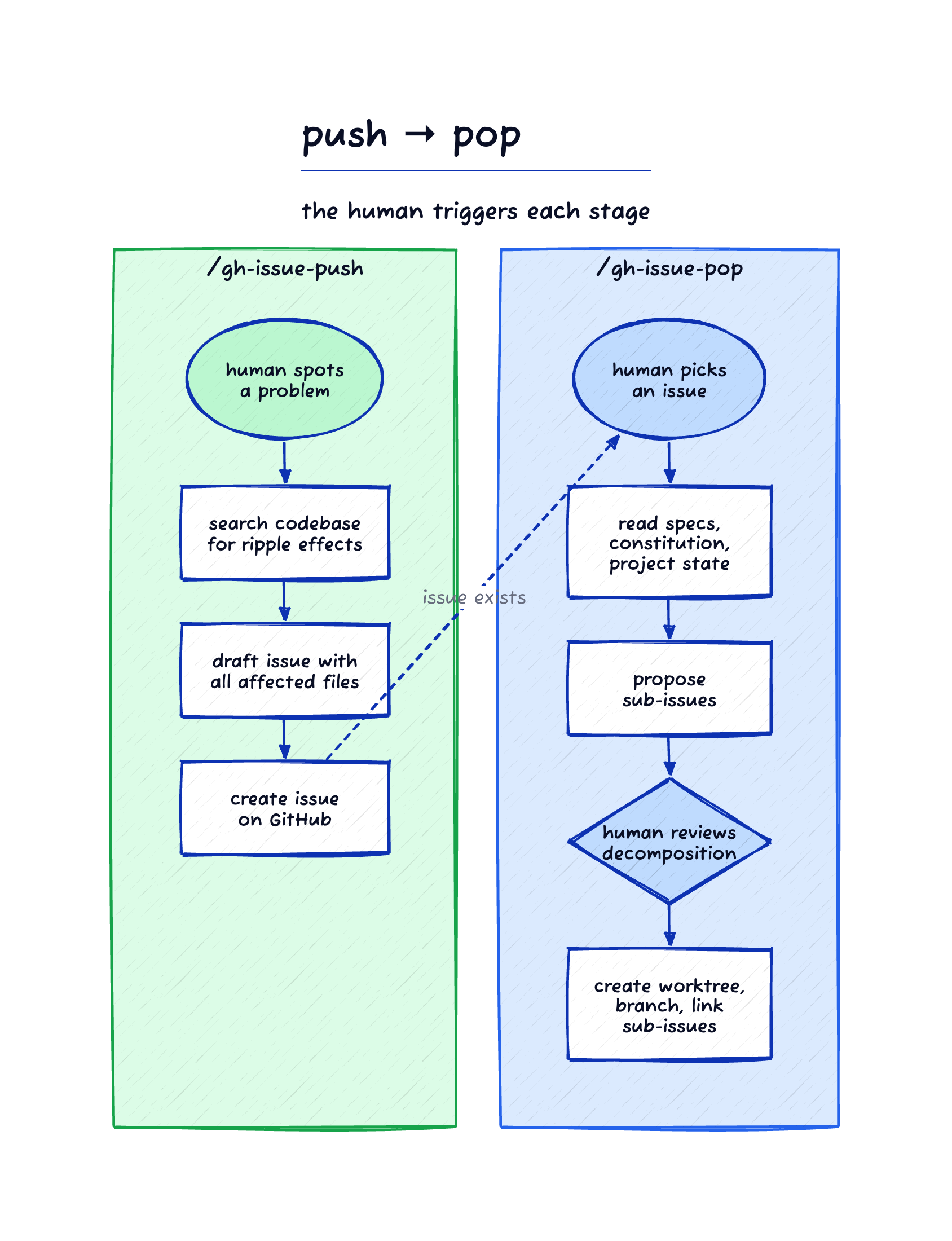
Figure 3. Push and pop, two commands in one loop. /gh-issue-push writes a self-contained issue to GitHub with everything the next session needs. /gh-issue-pop reads that issue in a fresh context window, decomposes it into sub-issues, and creates an isolated worktree. The human triggers both and reviews the decomposition before work begins.
Step 1: Plan the work
/make-work
First, the agent parses VISION.yaml, ARCHITECTURE.yaml, road-map.yaml and the design constitution, then scans the open‑issue list and executes mage analyze to expose specification gaps. It then drafts no more than ten issues, each labeled as documentation or code, listing required reading, the files to be added or altered, the necessary requirements, and the acceptance criteria. I will skip the creation step because nothing is instantiated until you sign off on the breakdown. The timing and scope of construction remain entirely your decision.
Step 2: Create the issues
Once you approve the plan, the agent runs /gh-issue-push for each ticket. It doesn’t write a title and body right away; instead it scans the codebase, tracing ripple effects through every file, field and cross‑reference. The issue body then contains everything the model needs to operate without prior context, so the session state lives in GitHub.
Step 3: Pop an issue into a worktree
/gh-issue-pop 42
A fresh session is launched, the agent reads the project specifications and pulls the issue body from GitHub. It then sketches a split into sub‑issues, putting documentation first and code tasks second, and pauses for your go‑ahead. After you approve, it spins up a git worktree on a feature branch, opens the sub‑issues on GitHub and ties each to the parent so the issue page reflects progress. The primary repository remains on main; every later step runs inside the worktree.
I always scan the decomposition before I begin. At times I discover sub‑issues that are oversized, unnecessary, or that the reading list lacks a file. I correct those, and then the work starts.
Step 4: Execute
/do-work
When tasked, the agent selects an open sub‑issue from its parent, claims it, loads the necessary files, and fulfills the requirements. It runs mage analyze to validate consistency, logs token usage as a GitHub comment, and commits. Documentation sub‑issues are chosen before code sub‑issues, since design must come first. After the final sub‑issue is closed, it opens and merges a pull request.
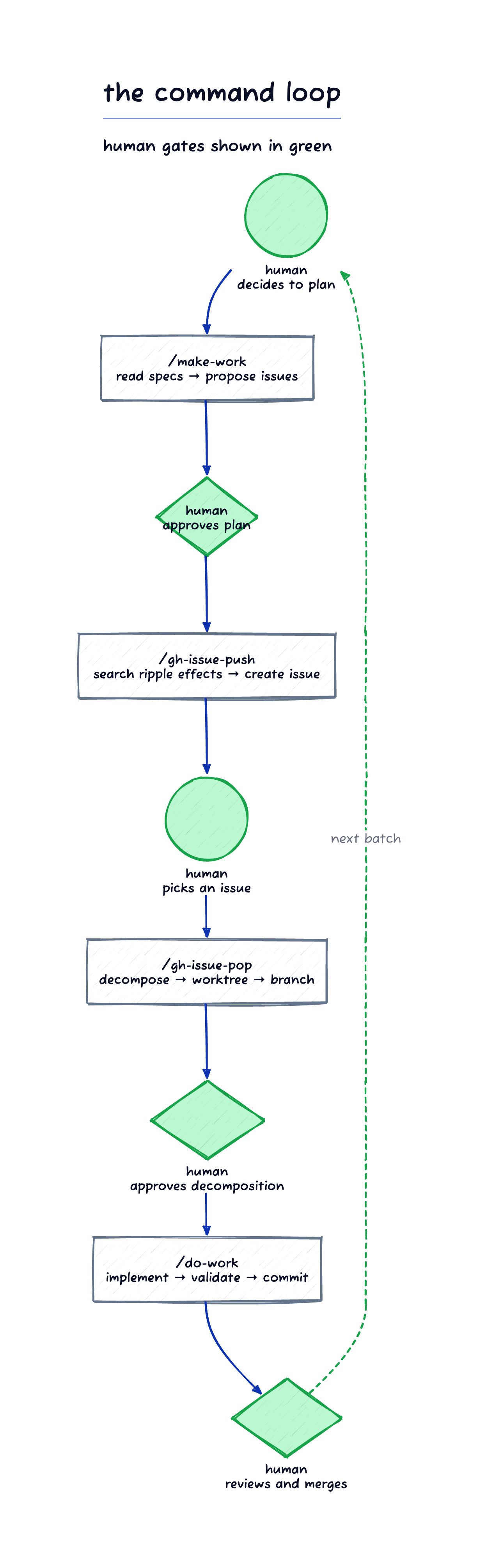
Figure 4. The full command loop with human gates. Every green node is a human decision. The model executes inside each command; the human decides when to move from one command to the next.
A complete cycle runs plan, push, pop, work, review, then returns to planning. GitHub links each stage to the next. Each command starts cold, pulls what it needs from GitHub and the project files, and writes the results back. The model retains nothing between stages; the project’s memory lives with you and in the issue tracker.
Repeating work—regression runs, dependency upgrades, aligning documentation to the code—skips /make-work for discovery. In my repos, these loops begin with a recurring issue titled Recurring: whose body records the protocol and run history, and closing it spawns the next instance. The regression chain in cobbler-scaffold has already passed its fiftieth iteration. I still fire every run; the issue remembers which run it is. I will discuss that pattern in a later article.
Your role and the model’s role divide the work. You fire each command, endorse the plan and its breakdown, and choose the stopping point. The model pulls in context, runs the command, and checks the result. This corresponds to Hosni’s six stages [2]; each of you covers three.
After you have run the four steps manually, a single prompt can drive an entire turn:
Run one turn of the development loop using the coding-skills commands.

1. Run /make-work and show me the proposed batch of issues. Wait for
   my approval before creating anything.
2. After I approve, file the issues with /gh-issue-push.
3. Ask me which issue to work. Run /gh-issue-pop on it and show me the
   proposed sub-issues. Wait for my approval.
4. After I approve, run /do-work until the sub-issues are closed and
   the pull request is open and merged.

Then stop and summarize what merged and what is still open. Do not
start another turn. I decide when the loop goes again.
All gates persist. The prompt halts at the green node shown in Figure 4 and waits, which removes the typing between gates. Every call counts as a single turn and stays under your control. The final prompt line is the scheduling move illustrated in Figure 2, recorded and retained by a human.
Why You Should Stay In Charge
Some advocate “loop-engineering,” automating scheduling with a cron job that finds, hands off, and verifies work. I don’t see why you would do that.
Services drop. GitHub and the Anthropic API suffer outages. When an autonomous loop hits a 503 at 3 AM, mid‑turn, you have to add retry logic and state‑recovery steps to keep the state file from corrupting. That shifts a code‑generation issue into a distributed‑systems issue. When I take the scheduler role, those failures are trivial — I simply retry later, and no state is corrupted nor a half‑finished worktree left to sort out.
The context stays cleaner this way. Autonomous loops accumulate context across turns, dragging along outdated reasoning and results. As the window expands, the model drops the earliest bits. I start each invocation fresh, letting the model see only what the command requires: the issue body, the specs, the constitution. No stale material lingers.
Osmani says comprehension rot is one of three risks that worsen with better loops [1]: the faster the loop ships code you didn’t write, the bigger the gap between the code and your understanding. Your codebase swells, but your mental map stalls. When something breaks you debug from ignorance. Verification gaps appear when the model checks its own output against loose conditions. Then cognitive surrender sets in because the loop handles everything.
OpenAI’s guide to building agents calls planning for human intervention “a critical safeguard” and suggests “handing control back to the user” [9]. Anthropic’s engineering guidance adds that agents should pause for human feedback at checkpoints, noting success “isn’t about building the most sophisticated system” but “the right system for your needs” [10]. These are the human gates I mean. Cherny’s adoption ladder does the same: at each of its five steps, the bottleneck is the human—your attention, then reviewing output, then trust in the loop [12]. When the guide and the keynote disagree, I read the guide.
What do these loops do in practice? The Pragmatic Engineer asked developers; most of the roughly 210 answers were triggers and cron jobs. Respondents complained that agents drift and token budgets burn, noting that humans in the loop produce better results [11]. One director of engineering remarked, “Sometimes it feels like AI enthusiasts forgot automation was a thing before LLMs” [11]. Orosz reaches the same point I do: for most developers, grasping the context window matters more than automating the scheduler.
Could the split simply be about incentives? Cherny is at Anthropic; Osmani is at Google. The people shaping loop engineering sit at token‑selling firms, and the adoption ladder ties each rung to a product that nudges you forward [12]. An autonomous loop that runs overnight, spawns sub‑agents, retries on failure, and feeds its own output back in is built to consume tokens. The provider’s and the user’s incentives differ.
Autonomous loops are motorcycles. They are fast and dangerous enough that you need a reason to ride one. Most developers who code with AI agents travel only three miles, yet the loop‑engineering discourse keeps hawking motorcycles while a bicycle—cheap, human‑powered, under their control—gets them there.
The model gets the work. I keep the thinking.
REFERENCES
[1] Osmani, A. (2026). “Loop Engineering.” AddyOsmani.com. https://addyosmani.com/blog/loop-engineering/
[2] Hosni, Y. (2026). “How to Create Loops with Claude.” To Data & Beyond.

[3] Cherny, B. (2026). “Head of Claude Code: What happens after coding is solved.” Lenny’s Newsletter.

[4] Cherny, B. (2026). “How Boris Uses Claude Code.”
https://howborisusesclaudecode.com/
[5] Cherny, B. (2026). “I haven’t written a line of code by hand in eight months.” Fortune Brainstorm Tech. https://fortune.com/2026/06/11/anthropic-claude-boris-cherny-doesnt-write-code-by-hand-anymore/
[6] HuaShu (2026). Loop Engineering: Stop Asking Me What It Is. Orange Books, v260615. https://huasheng.ai/orange-books
[7] Djukic, P. (2026). coding-skills: spec-driven development commands and rule documents for coding agents. GitHub. https://github.com/petar-djukic/coding-skills
[8] Latent.Space (2026). “AIEWF Daily Dispatch: The great loops debate and the state of AI engineering.”

[9] OpenAI (2025). A Practical Guide to Building Agents. https://cdn.openai.com/business-guides-and-resources/a-practical-guide-to-building-agents.pdf
[10] Anthropic (2024). “Building Effective AI Agents.” https://www.anthropic.com/engineering/building-effective-agents
[11] Orosz, G. (2026). “What is ‘loop engineering?’” The Pragmatic Engineer.

[12] Cherny, B. (2026). “Steps of AI Adoption.” LinkedIn. https://www.linkedin.com/posts/bcherny_steps-of-ai-adoption-activity-7483695059843043328-LBg_
[13] Cherny, B. (2026). Remarks at Anthropic’s developer conference. YouTube.
The research and the ideas here are mine. I draft with AI assistance, then revise the text and verify every factual claim against its source. My full process is written up in How to Build a Writing Pipeline. I stand behind all of it.